
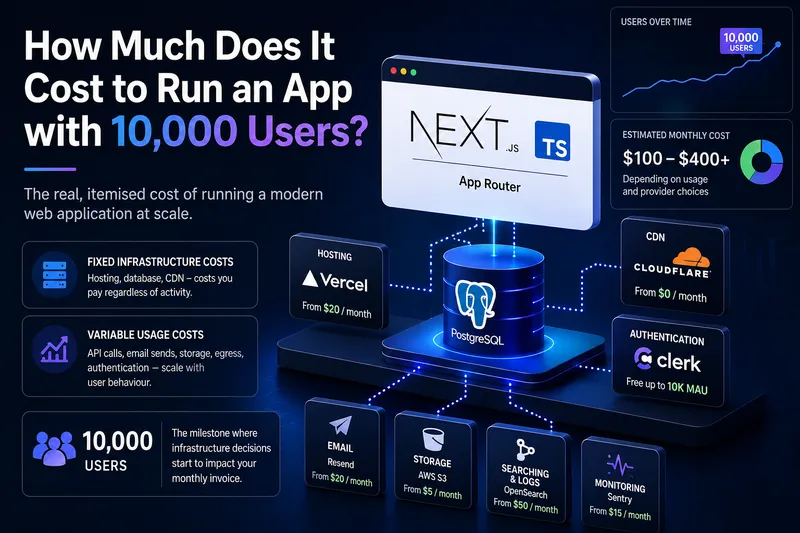
Most founders ask the wrong question. They obsess over how much it costs to build an app. The design sprints, the development hours, the launch. But the smarter, more consequential question is: how much does it cost to run it once real users arrive?
Reaching 10,000 users is a milestone worth celebrating. It's also the point where infrastructure choices stop being theoretical and start showing up on your monthly invoice. At this scale, what you don't know or didn't plan for will cost you.
This guide breaks down the real, itemised cost of running a modern web application at 10,000 users, built on Next.js with TypeScript (App Router) and PostgreSQL as the database one of the most popular production stacks in use today. By the end, you will know exactly what to budget, which services to choose at this scale, and where to optimise before costs spiral.
1. Why 10,000 Users Is the Real Cost Benchmark
When your app has a few hundred users, you can get by on free tiers and starter plans. Vercel's hobby tier, Supabase's free plan, free-tier email APIs they all look like a cost of zero. But free tiers are designed for prototypes, not production. They have hard limits on bandwidth, compute, and concurrent connections that quietly break down the moment real traffic arrives.
Ten thousand users changes everything, and here's why: it's not just 10x the load of 1,000 users it's the threshold where concurrent activity, database connection counts, file storage reads, and outbound email volume all begin to compound simultaneously. A single product launch email to 10K addresses, for example, will blow past most free-tier sending limits in one shot.
Understanding costs at this scale means separating two distinct categories:
- Fixed infrastructure costs — hosting, database instances, CDN — that you pay regardless of activity
- Variable usage costs — API calls, email sends, storage egress, serverless function invocations — that scale directly with user behaviour
The architectural decisions you make at 1,000 users server-side rendering vs static generation, managed database vs self-hosted, monolith vs edge functions have compounding cost consequences by the time you reach 10,000.
2. Breaking Down the Infrastructure Stack
2.1 Hosting — Next.js App Router Deployment
Next.js is the framework of choice for most modern TypeScript web apps, and for good reason. The App Router, introduced in Next.js 13 and now the default, brings React Server Components (RSC) to the forefront meaning more work happens on the server and less JavaScript ships to the browser. That's good for performance. The cost implication, however, is nuanced.
More server-side rendering means more compute. Every RSC render is a server invocation. At 10,000 users with moderate engagement, this matters.
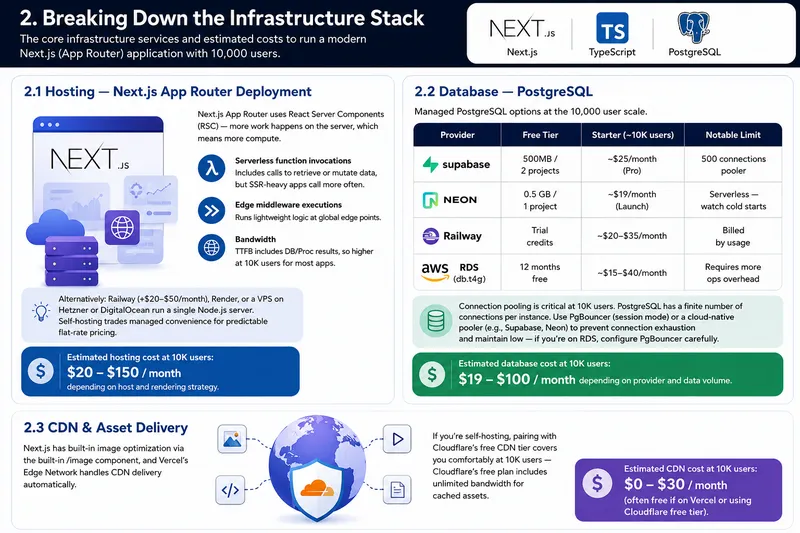
Vercel (the default platform for Next.js) charges on the Pro plan at $20/month base. At 10K users, you will likely consume:
- Serverless function invocations — included up to 1M/month on Pro, but SSR-heavy apps can exceed this
- Edge middleware executions — billed separately; keep middleware lean
- Bandwidth — 1TB included on Pro; realistically fine at 10K users for most apps
Alternatives worth considering at this scale include Railway (~$20–$50/month), Render, or a VPS on Hetzner or DigitalOcean running a self-hosted Next.js server. Self-hosting trades managed convenience for predictable flat-rate pricing — often a smart move once you understand your traffic patterns.
Estimated hosting cost at 10K users: $20–$150/month depending on host and rendering strategy.
2.2 Database — PostgreSQL
PostgreSQL remains the gold standard for relational data, and the managed PostgreSQL ecosystem has expanded dramatically. At 10,000 users, your primary concerns are connection limits, query performance, and storage.
| Provider | Free Tier | Starter (~10K users) | Notable Limit |
|---|---|---|---|
| Supabase | 500MB / 2 projects | ~$25/month (Pro) | 500 connections pooled |
| Neon | 0.5 GB / 1 project | ~$19/month (Launch) | Serverless — watch cold starts |
| Railway | Trial credits | ~$20–$35/month | Billed by usage |
| AWS RDS (t3.micro) | 12 months free | ~$15–$40/month | Requires more ops overhead |
One critical PostgreSQL concern at 10K users is connection pooling. PostgreSQL has a finite number of concurrent connections, and a Next.js App Router application can spawn many serverless function instances, each opening its own connection. Without PgBouncer or Supabase's built-in pooler, you will hit connection limits under load. Both Supabase and Neon handle this automatically. If you're on raw RDS, configure PgBouncer explicitly.
Estimated database cost at 10K users: $19–$100/month depending on provider and data volume.
2.3 CDN & Asset Delivery
Next.js has built-in image optimisation via the next/image component, and Vercel's Edge Network handles CDN delivery automatically. If you're self-hosting, pairing with Cloudflare's free CDN tier covers you comfortably at 10K users. Cloudflare's free plan includes unlimited bandwidth for cached assets.
Estimated CDN cost at 10K users: $0–$30/month (often free if on Vercel or using Cloudflare free tier).
3. The Hidden Costs Nobody Talks About
Infrastructure is only part of the story. The services below are often omitted from early budgets and they're precisely where surprise invoices come from.
3.1 Authentication
Clerk is the most popular auth solution for Next.js App Router, and its free tier covers up to 10,000 Monthly Active Users (MAU) — which means at exactly 10K users, you're still in the clear. However, the moment you cross that threshold, pricing jumps to $25/month on the Pro plan. Plan for it.
NextAuth.js (Auth.js) is a free, self-hosted alternative that integrates cleanly with the App Router. It requires a database adapter (PostgreSQL works natively) and slightly more setup, but eliminates per-user auth costs entirely.
Estimated auth cost at 10K users: $0–$25/month
3.2 Email & Transactional Messaging
At 10,000 users, email volume adds up fast. A simple onboarding flow welcome email, email verification, weekly digest can generate 30,000–50,000 sends per month without much effort. Free tiers typically cap at 3,000–5,000/month.
- Resend — 3,000 emails/month free; $20/month for 50,000 sends. Excellent Next.js SDK integration.
- SendGrid — 100 emails/day free; $19.95/month for 50,000.
- Postmark — no free tier; ~$15/month for 10,000 sends. Superior deliverability.
Estimated email cost at 10K users: $10–$40/month
3.3 File Storage & Uploads
If your app handles user uploads — avatars, documents, media — you'll need object storage. The cost differentiator at 10K users is egress fees: every time a file is downloaded, you pay for the data transferred out.
- Cloudflare R2 — $0 egress fees. $0.015/GB stored. The most cost-effective option at this scale.
- Supabase Storage — built into your Supabase plan; simplest integration if already on Supabase.
- AWS S3 — $0.023/GB stored + egress fees. Powerful but can get expensive without a CDN in front.
Estimated storage cost at 10K users: $5–$30/month depending on upload volume and egress.
3.4 Monitoring & Observability
Skipping monitoring is a false economy. At 10,000 users, a silent error or performance regression can silently churn hundreds of users before you notice. The question isn't whether to monitor — it's which tools to prioritise.
- Sentry — error tracking; free for 5K errors/month. $26/month for the Team plan.
- Vercel Analytics — built-in if on Vercel; Web Vitals and page-level performance.
- PostHog — product analytics (funnels, session replay, feature flags); free up to 1M events/month. Genuinely valuable at 10K users.
Estimated monitoring cost at 10K users: $0–$50/month (PostHog free tier often covers this scale entirely).
3.5 CI/CD & Developer Tooling
GitHub Actions provides 2,000 free minutes/month on free plans, 3,000 on Pro. For a Next.js project with TypeScript, type-checking and build steps typically consume 3–6 minutes per run. At a healthy development cadence of 20–30 deploys/month, you're well within free limits. Vercel's preview deployments are included on the Pro plan.
Estimated CI/CD cost at 10K users: $0–$20/month
4. Real Cost Scenarios — Three App Profiles
Theory is useful. Numbers are more useful. Below are three realistic app profiles at 10,000 users, with itemised monthly costs based on actual service pricing.
| Cost Category | Lean SaaS | Growth-Stage App | Data-Heavy Platform |
|---|---|---|---|
| Hosting (Vercel/Railway) | $20 | $60 | $150 |
| PostgreSQL (managed) | $19 | $50 | $100 |
| Authentication | $0 | $25 | $25 |
| Email (transactional) | $10 | $20 | $40 |
| File Storage | $5 | $15 | $30 |
| Monitoring & Analytics | $0 | $26 | $50 |
| CI/CD | $0 | $10 | $20 |
| Monthly Total | ~$54 | ~$206 | ~$415 |
Lean SaaS: A content-focused or B2B tool app with light uploads, email-gated access, and mostly static or ISR-rendered pages. Clerk on the free tier, Neon on the Launch plan, Resend on the free plan.
- Growth-Stage App: A consumer product with active user sessions, avatar uploads, onboarding flows, and regular feature deployments. Supabase Pro, Vercel Pro, Clerk Pro.
- Data-Heavy Platform: An analytics dashboard, marketplace, or media app with high read/write DB volume, heavy file storage, and complex user flows requiring full observability.
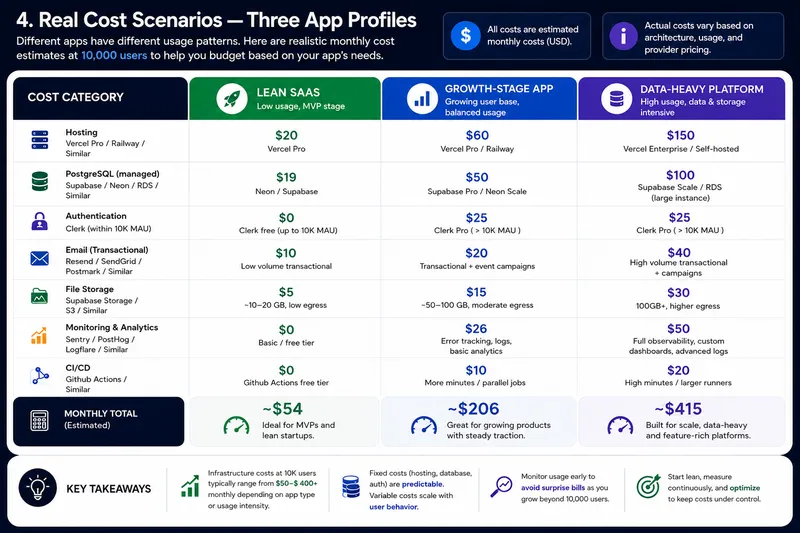
The most important takeaway: most apps at 10,000 users on a well-optimised Next.js + PostgreSQL stack cost between $50 and $250/month far less than founders typically fear. The outliers are apps with poor architecture, unmanaged egress, or services chosen for familiarity rather than fit.
5. Optimisation Strategies to Cut Costs Without Cutting Corners
5.1 Use Static Generation and ISR Aggressively
Next.js App Router gives you fine-grained control over rendering strategy at the route level. Server Components render on the server, but if the data doesn't change per-user or per-request, you should be generating that page statically. Incremental Static Regeneration (ISR) via the revalidate option lets you serve cached pages and regenerate them in the background on a schedule.
Every statically served page is a server invocation you didn't pay for. On a content-heavy app, moving 60–70% of pages to ISR can halve your compute costs at 10K users.
5.2 Fix PostgreSQL Connection Management
This is the single most common infrastructure mistake in Next.js + PostgreSQL apps. Each serverless function instance opens its own database connection. Under load, you can easily exhaust PostgreSQL's connection limit, causing cascading failures and slow queries that increase compute time both of which cost money.
Solutions: use Supabase's built-in connection pooler, configure PgBouncer in transaction mode if on RDS, or use Neon's serverless driver which is designed for ephemeral connections. Pair this with proper query indexing slow queries consume more compute time than fast ones.
5.3 Choose Cloudflare R2 for Storage from Day One
If your app handles any file storage, R2's zero-egress-fee model is almost always cheaper than S3 at 10K users, and the gap widens as you scale. Migrating storage providers later is painful. Choose R2 from the start, or at least before you reach significant upload volume.
5.4 Don't Over-Provision — Re-evaluate at Each Scale Milestone
The temptation to jump to higher service tiers early is understandable, but rarely justified at 10K users. Most managed services at this scale are comfortably handled by mid-tier plans. Set billing alerts at 80% of your expected monthly budget and review service tiers at 5K, 10K, 25K, and 50K users not before.
5.5 Cache API Responses with Next.js Fetch Tags
Next.js 14+ supports granular cache invalidation via fetch cache tags. When you fetch data in a Server Component, tagging the response lets you invalidate only the relevant cached data on mutation — rather than revalidating entire routes. This reduces redundant database queries and server invocations, which directly maps to lower PostgreSQL compute time and fewer Vercel function executions.
6. When to Bring in Professional Help
There is a category of cost that doesn't appear on any invoice: the cost of wrong decisions. Poor schema design, un-indexed queries, an SSR-heavy app that should have used ISR, file storage on S3 without a CDN each of these is an architectural mistake that compounds quietly until it becomes a billing shock or a performance crisis.
Signs you may need expert input on your stack:
- Your Vercel bill increases significantly without a corresponding increase in traffic
- PostgreSQL queries are slow despite what seems like correct indexing
- Users report intermittent slowness that you cannot reproduce locally
- Your Next.js build times are increasing and preview deployments are timing out
- You're unsure whether your rendering strategy (SSR vs SSG vs ISR) is appropriate for each route
Getting architecture right from the start — before you hit 10K users — saves 3 to 5 times the cost in retroactive fixes, migrations, and lost users due to poor performance. If you're building a product that needs to scale cleanly, Teckgeekz works with digital teams to make those architecture decisions correctly the first time, from tech stack selection through to deployment configuration.
Front-end performance is also a hidden infrastructure cost: a slow, unoptimised UI increases bounce rates, drives more repeated server requests, and inflates your CDN and compute usage. Investing in performant web design is not just a UX decision — it directly reduces your monthly infrastructure bill at scale.
Conclusion
Running a Next.js (App Router) + PostgreSQL application for 10,000 users costs, in most realistic scenarios, between $50 and $250 per month. Data-intensive or poorly optimised applications can push that toward $400 or beyond but that is a choice, not an inevitability.
The variance in those numbers isn't random. It is a direct consequence of rendering strategy choices, database vendor selection, connection pooling discipline, storage egress configuration, and whether someone invested the time early to make the architecture match the product's actual usage patterns.
The companies that hit 10K users and barely notice the infrastructure bill are not the ones with the biggest budgets. They're the ones who planned for scale before they needed it who chose the right tools, asked the right questions, and treated architecture as a product decision rather than an afterthought.
Audit your stack now. The cheapest infrastructure problems to fix are the ones you catch before 10,000 users find them for you.
Sources
• Vercel Pricing — https://vercel.com/pricing
• Supabase Pricing — https://supabase.com/pricing
• Neon Pricing — https://neon.tech/pricing
• Clerk Pricing — https://clerk.com/pricing
• Cloudflare R2 Pricing — https://developers.cloudflare.com/r2/pricing
• Resend Pricing — https://resend.com/pricing
• Railway Pricing — https://railway.app/pricing
• Sentry Pricing — https://sentry.io/pricing
• PostHog Pricing — https://posthog.com/pricing
• Next.js App Router Documentation —
https://nextjs.org/docs/app